Randomly Place Wireless Nodes in Rectangle and in Overlapping Area with Circle
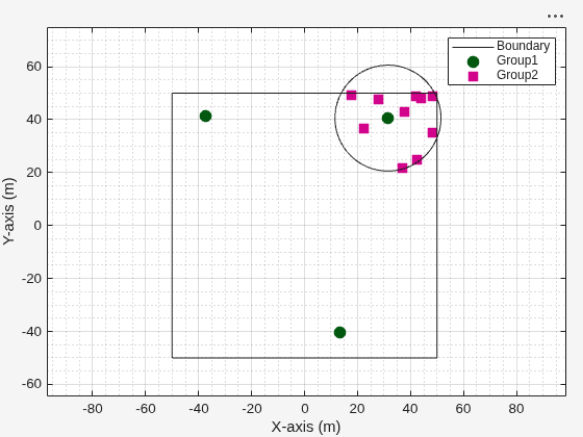
R2026bUse the nodePositionRandom function to randomly place two groups of wireless nodes: you distribute the first group within a 100-by-100 meter rectangle, and then place the second group within the intersection of that rectangle and a 20-meter radius circle centered at the first node of the first group.
Define the size of the rectangle, the number of nodes in each group, and the radius of the circle.
areaSize = [100 100];        % Rectangle size (meters)
numGroup1Nodes = 3;          % Number of nodes in the first group (rectangle)
circleRadius = 20;           % Circle radius (meters)
numGroup2Nodes = 10;         % Number of nodes in the second group (intersection)
Randomly distribute the first group of nodes within the 100-by-100 meter rectangle.
[group1Positions, parentBoundaryPolygon] = nodePositionRandom("rectangle",areaSize,NumNodes=numGroup1Nodes);Randomly place the second group of nodes within the intersection of the rectangle and a 20-meter radius circle centered at the first node of group 1.
[group2Positions,intersectBoundaryPolygon] = nodePositionRandom( ...
    parentBoundaryPolygon,"circle",circleRadius, ...
    Center=group1Positions(1,:),NumNodes=numGroup2Nodes);
Create a wireless network viewer.
viewer = wirelessNetworkViewer;
Add the first group of nodes, from the rectangle, to the viewer.
addNodes(viewer,group1Positions,Type="Group1")Add the second group of nodes, from the intersection of rectangle and circle, to the viewer.
addNodes(viewer,group2Positions,Type="Group2")Show the rectangle boundary.
showBoundary(viewer, ...
    Position=[0 0 0], ...
    BoundaryShape="rectangle", ...
    Bounds=areaSize, ...
    Name="RectangleBoundary", ...
    Tag="RectangleTag")
Show the intersection circle boundary.
showBoundary(viewer, ...
    Position=[group1Positions(1,1), group1Positions(1,2), 0], ...
    BoundaryShape="circle", ...
    Bounds=circleRadius, ...
    Name="IntersectionCircle", ...
    Tag="CircleTag")
This approach applies to various wireless network scenarios:
5G Networks: Assign the first group of nodes as base stations ( gNBs) and the second group as user equipment ( UEs). Place UEs within the coverage area of a gNB, using constraints to create realistic deployments.
WLAN (Wi-Fi) Networks: Use the first group for Access Points and the second group for Stations. Position Stations within both the building (rectangle) and the signal range (circle) of an Access Point.
Bluetooth Networks: Set the first group as Central devices and the second group as Peripherals. Place Peripherals within the communication range of a Central device.

