How to color an image

Show older comments

I have this photo and I have to color every hexagon from her with a different color.
Answers (2)

SlipperyGnome
on 1 Jul 2022
0 votes
You can go through this link to create coloured hexagons using patch- https://www.mathworks.com/matlabcentral/answers/282942-colored-hexagons-using-patch
You can also see here to understand how to find the boundaries of each hexagon in the image- https://www.mathworks.com/matlabcentral/answers/110871-how-to-detect-the-hexagon-in-imageprocessing
Hope this helps.
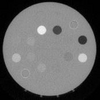
Try the following:
I = imread('https://www.mathworks.com/matlabcentral/answers/uploaded_files/1052130/image.png');
BW = imbinarize(rgb2gray(I));
[L,n] = bwlabel(BW);
J1 = label2rgb(L);
J2 = imoverlay(J1,~BW,'black'); % Make sure the background is black color
imshow(J2);

Categories
Find more on Image Arithmetic in Help Center and File Exchange
on 1 Jul 2022
on 1 Jul 2022
Community Treasure Hunt
Find the treasures in MATLAB Central and discover how the community can help you!
Start Hunting!
