Draw best fitting Maxwell Boltzmann PDF
Show older comments
I got a dataset with values corresponding to velocities.
I need to obtain the PDF for those velocities. I'm not sure if I'm doing it correctly but here's my code for that:
input1 = dlmread('velocities_test.txt', ''); %dataset
input1([1,1],:) = [];
col1 = input1(:,1); %col1 has the values I want
[p,t] = hist(col1, 30);
d = (p/sum(p)); %this is my PDF
After that I want to draw the best fitting Maxwell Boltzmann PDF for the PDF I obtained before.
The formula is the following:
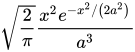
What I need to do is to try several values for the 'a' parameter and find the best fitting ecuation.
a = (1.0:0.01:5.0); % generating values for a between 1.0 and 5.0
for i=1:length(a)
for j = 1:length(t)
%Matriz de valor de 'ym'. Columnas = y(t) Filas = Cada Ym
y(i,j) = sqrt(2/pi)*((t(j)*exp((-t(j)^2)/(2*(a(i)^2))))/(a(i)^3)) ; %this is the formula staten above
endfor
endfor
figure(1)
for i = 1:length(a)
plot(t,y(i,:),'m-')
hold on
end
xlabel('Velocidad [m/s]')
ylabel('y(t)')
figure(1)
plot(t,d,'r-', "linewidth", 2)
set(gca, 'FontSize', 20)
Turns out this looks terrible and none of the functions seems to be the best fitting one.
Here they are in comparison to the original values:

What can I do to make the pink lines better? They look so small in comparison to the red one.
1 Comment

the cyclist
on 24 Sep 2019
Not directly answering your question, but ...
Is there a reason you are doing this "fitting" manually, rather than using one of MATLAB's fitting functions (e.g. fitnlm from the Statistical and Machine Learning Toolbox).
Accepted Answer
the cyclist
on 24 Sep 2019
It looks like the term ahead of the exponential should be
t(j).^2
rather than
t(j)
1 Comment

Alejandro Santoflaminio
on 24 Sep 2019
More Answers (0)
Categories
Find more on Get Started with Curve Fitting Toolbox in Help Center and File Exchange
Products
on 24 Sep 2019
on 24 Sep 2019
Community Treasure Hunt
Find the treasures in MATLAB Central and discover how the community can help you!
Start Hunting!
