exportToRoadRunner
R2026bSyntax
Description
Add-On Required: This feature requires the Scenario Builder for Automated Driving Toolbox add-on.
exportToRoadRunner( exports the
input trajectory trajectory)trajectory to RoadRunner. The function opens a dialog box in which you must specify the project folder
and installation folder to use when opening RoadRunner. For more details about the RoadRunner installation folder and project folders, see the
InstallationFolder and ProjectFolder properties
of the roadrunner object. The
LocalOrigin property of the input
Trajectory object sets the world origin of the RoadRunner scene.
exportToRoadRunner(
exports the input trajectory trajectory,rrApp)trajectory to the RoadRunner instance connected to rrApp.
exportToRoadRunner(___,
specifies options using one or more name-value arguments in addition to any combination of
input arguments from the previous syntaxes. For example, Name=Value)Color="blue"
exports a blue color actor to RoadRunner.
rrApp = exportToRoadRunner(___) returns a RoadRunner application as a roadrunner object
rrApp using any combination of input arguments from the previous
syntaxes.
Note: To use this feature you must install RoadRunner and activate your RoadRunner license interactively. For more information, see Install and Activate RoadRunner (RoadRunner).
Examples
Load recorded GPS trajectory data into the workspace.
load("recordedGPSData.mat","X","Y","Z","timestamps")
Create a trajectory object by using the loaded timestamps and xyz-coordinates.
traj = scenariobuilder.Trajectory(timestamps,X,Y,Z);
Smooth the trajectory.
smooth(traj)
Export the trajectory to RoadRunner.
exportToRoadRunner(traj)
Connection status: 1
Connected to RoadRunner Scenario server on localhost:54322, with client id {3c820a6c-2dbb-4d44-acbf-46303fbb8d64}
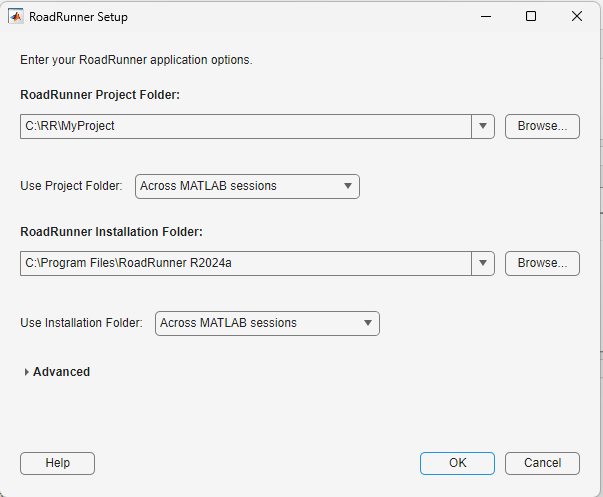
The exportToRoadRunner function opens a dialog box. Specify the project folder and installation folder, and select OK.
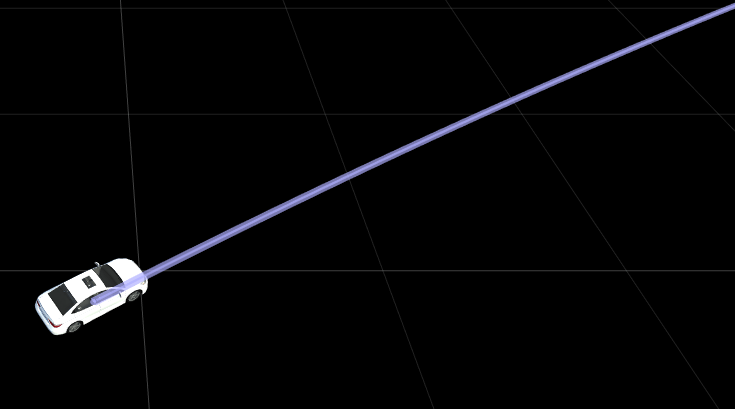
The exportToRoadRunner function exports the trajectory to RoadRunner. Visualize the trajectory exported to RoadRunner.
Load recorded GPS data into the workspace.
load("recordedGPSData.mat","X","Y","Z","timestamps")
Create a trajectory object by using the loaded timestamps and xyz-coordinates.
traj = scenariobuilder.Trajectory(timestamps,X,Y,Z);
Normalize the timestamps of the created trajectory object.
normalizeTimestamps(traj)
Smooth the trajectory.
smooth(traj)
Specify the path to your local RoadRunner installation folder. This code shows the path for the default installation location on Windows®.
rrAppPath = "C:\Program Files\RoadRunner " + matlabRelease.Release + "\bin\win64";
Specify the path to your RoadRunner project. This code shows the path to a sample project folder on Windows.
rrProjectPath = "C:\RR\MyProject";Open RoadRunner using the specified path to your project.
rrApp = roadrunner(rrProjectPath,InstallationFolder=rrAppPath);
Export the trajectory to RoadRunner using the open RoadRunner instance rrApp.
exportToRoadRunner(traj,rrApp)
Connection status: 1
Connected to RoadRunner Scenario server on localhost:60729, with client id {3c191baf-8c50-4639-bf64-ce9b078522e3}
Visualize the trajectory exported to RoadRunner.

Input Arguments
Name-Value Arguments
Specify optional pairs of arguments as
Name1=Value1,...,NameN=ValueN, where Name is
the argument name and Value is the corresponding value.
Name-value arguments must appear after other arguments, but the order of the
pairs does not matter.
Example: exportToRoadRunner(trajectory,Color="blue") exports a blue
color actor to RoadRunner.
Name of the actor in RoadRunner, specified as a string scalar or character vector. RoadRunner uses the name specified by this argument for the actor it associates
with your exported trajectory. By default, the function assigns the name for the actor
as vehicle. For an existing actor with name
Name, the function appends an incremental numeric integer at
the end of the name. For example, if an actor with name vehicle
already exists, the function names the actor as vehicle1
instead.
Example: Name="Actor1" specifies the name of the actor as
Actor1.
Data Types: char | string
Color of the actor in driving scenario, specified as "auto", a
string scalar, or character vector corresponding to an SVG 1.0 color name, such as
"blue", a 3-element row vector of values in the range
[0,1], where the values correspond to the
intensities of the red, green, and blue components of color, respectively, or a
hexadecimal color code, such as "#0072BD". Driving scenario uses
the color specified by this argument for the actor it associates with your exported
trajectory. By default, the function automatically assigns a color for the
actor.
This table lists the valid color names with the equivalent RGB triplets and hexadecimal color codes.
| Color Name | Short Name | RGB Triplet | Hexadecimal Color Code | Appearance |
|---|---|---|---|---|
"red" | "r" | [1 0 0] | "#FF0000" |
|
"green" | "g" | [0 1 0] | "#00FF00" |
|
"blue" | "b" | [0 0 1] | "#0000FF" |
|
"cyan"
| "c" | [0 1 1] | "#00FFFF" |
|
"magenta" | "m" | [1 0 1] | "#FF00FF" |
|
"yellow" | "y" | [1 1 0] | "#FFFF00" |
|
"black" | "k" | [0 0 0] | "#000000" |
|
"white" | "w" | [1 1 1] | "#FFFFFF" |
|








Example: Color="Green" sets the color of the actor in driving
scenario to green.
Actor asset file name or path, specified as a string scalar or character vector. This value specifies the absolute or relative path in the RoadRunner Asset Library for the Asset Type attribute of the actor. By default, the function automatically assigns an asset path for the actor.
If you specify a filename instead of a path, the specified file must be present in
the current RoadRunner project folder. If you specify a path, then the function creates a copy
of the file in the specified path to the Assets/Vehicles directory
of the current RoadRunner project folder.
Example: AssetPath="Assets/Vehicles/Sedan.fbx" sets the path for
the actor as a sedan vehicle asset.
Data Types: char | string
Set up RoadRunner simulation status, specified as a logical 1
(true) or 0 (false).
Specify true to create a new RoadRunner scenario with a trajectory, which also updates the simulation start
time, end time, and sample rate per the input trajectory
trajectory.
Specify false to add a trajectory to the existing RoadRunner scenario, which does not update the simulation start time, end time, and
sample rate. If you specify false, additionally, the function enables you to export
multiple trajectories into the RoadRunner scenario.
Data Types: logical
Filename of the RoadRunner scene to which to export the trajectory, specified as a string scalar or
character vector. This argument specifies the absolute or relative path of the
RoadRunner scene binary file to which you want to write the trajectory. If you
specify a relative path, then the path is relative to the Scenes
folder of the current project. The value of RoadRunnerScene must
end with .rrhd or .rrscene.
If you specify a filename instead of a path, the specified file must be present in
the current RoadRunner project folder. If you specify a path, then the function creates a copy
of the file in the specified path to the Scenes directory of the
current RoadRunner project folder.
Example: RoadRunnerScene="MyProject/Scenes/FourWaySignal.rrscene"
specifies the RoadRunner scene FourWaySignal.rrscene on the project path
MyProject/Scenes.
Data Types: char | string
Version History
Introduced in R2024b
See Also
GPSData | Trajectory | CameraData | LidarData | recordedSensorData

