cameraParameters
Object for storing camera parameters
Description
The cameraParameters object stores the intrinsic, extrinsic,
and lens distortion parameters of a camera.
Creation
You can create a cameraParameters object using the
cameraParameters function described here. You can also create a
cameraParameters object by using the estimateCameraParameters with an
M-by-2-by-numImages array of input image
points. M is the number of keypoint coordinates in each
pattern.
Syntax
Description
cameraParams = cameraParameterscameraParameters object that contains the intrinsic,
extrinsic, and lens distortion parameters of a camera.
cameraParams = cameraParameters(Name=Value)cameraParameters object by using one or more name-value
arguments. Unspecified properties use default values. For example,
WorldUnits='m' sets the world units to
'm'.
For example, cameraParams = cameraParameters("RadialDistortion",[0
10]) sets the radial lens distortion property,
RadialDistortion, as the vector [0
10].
cameraParams = cameraParameters(paramStruct)cameraParameters object from an existing
cameraParameters object with parameters stored in
paramStruct.
Input Arguments
Properties
Intrinsic Camera Parameters:
Camera intrinsic matrix, specified as a 3-by-3 matrix. The matrix has this format:
The coordinates [cx
cy] represent the optical center (the principal
point), in pixels. When the x- and y-axes are exactly
perpendicular, the skew parameter s equals 0.
fx = F*sx
fy = F*sy
F is the focal length in world units, typically expressed in millimeters.
sx and sy are the number of pixels per world unit in the x- and y-direction respectively.
fx and fy are expressed in pixels.
This property is read-only.
Camera intrinsics object, stated as a cameraIntrinsics object. The
object contains information about camera intrinsic calibration parameters,
including lens distortion.
Dependency
You must provide an image size (using the
ImageSize property) for the
Intrinsics property to be non-empty. The
intrinsics for the camera parameters depends on the image size.
Image size, specified as a two-element vector [mrows ncols].
Camera Lens Distortion:
Radial lens distortion coefficients, specified as a 2-, 3-, or 6-element vector.
2-element vector — [k1 k2].
3-element vector — [k1 k2 k3].
6-element vector — [k1 k2 k3 k4 k5 k6].
The camera parameters object calculates the radial-distorted location of a point, denoted as (xdistorted, ydistorted):
| x, y is a undistorted image point in normalized image coordinates in world units, with the origin at the optical center. |
| r2 = x2 + y2 |
| k1, k2, …, k6 are radial distortion coefficients of the lens. Typically, two coefficients are sufficient and k3, …, k6 are only needed for wide-angle lenses. |
Tangential distortion coefficients, specified as a two-element vector. Tangential distortion occurs when the lens and the image plane are not parallel. The camera parameters object calculates the tangential distorted location of a point. You can denote the distorted points as (xdistorted, ydistorted). The undistorted pixel locations appear in normalized image coordinates, with the origin at the optical center. The coordinates are expressed in world units.
Tangential distortion occurs when the lens and the image plane are not parallel. The tangential distortion coefficients model this type of distortion.

The distorted points are denoted as (xdistorted, ydistorted):
xdistorted = x + [2 * p1 * x * y + p2 * (r2 + 2 * x2)]
ydistorted = y + [p1 * (r2 + 2 *y2) + 2 * p2 * x * y]
x, y — Undistorted pixel locations. x and y are in normalized image coordinates. Normalized image coordinates are calculated from pixel coordinates by translating to the optical center and dividing by the focal length in pixels. Thus, x and y are dimensionless.
p1 and p2 — Tangential distortion coefficients of the lens.
r2 = x2 + y2
Extrinsic Camera Parameters:
This property is read-only.
Calibration pattern extrinsics, specified as an
N-element vector or an
N-by-P array of
N number of rigidtform3d objects. Each rigidtform3d object represents the pose of the camera's image
plane relative to the corresponding calibration pattern.
The
Rproperty of eachrigidtform3dobject describes the 3-D rotation of the camera image plane relative to the corresponding calibration pattern.The
Translationproperty of eachrigidtform3dobject describes the translation t of the camera relative to the corresponding calibration pattern, expressed in world units.
For single-pattern calibration, specify
PatternExtrinsics as an N-element
vector. For multiple patterns, use an
N-by-P matrix.
This equation provides the transformation that relates a world coordinate in the checkerboard frame [X Y Z] and the corresponding image point [x y]:
w: arbitrary scale factor
K: camera intrinsic matrix
R: matrix representing the 3-D rotation of the camera
t: translation of the camera relative to the world coordinate system
The rigid geometric transformations do not take distortion
into consideration. Use the undistortImage function to
remove distortion.
This property is read-only.
3-D camera rotation vectors, specified as an R-by-3 matrix or an R-by-3-by-P array, containing R rotation vectors, where P is the number of calibration patterns. Each vector describes the 3-D rotation of the camera's image plane relative to the corresponding calibration pattern.
Each vector specifies the axis of rotation in 3-D space, with its
magnitude indicating the rotation angle in radians. The corresponding 3-D
rotation matrices are specified by the PatternExtrinsics
property, specifically in the form of tform.R, where
tform is a rigidtform3d object. The
PatternExtrinsics property specifies geometric
transformation objects with the corresponding 3-D rotation matrices.
For single-pattern calibration, specify
RotationVectors as an R-by-3
matrix. For multiple patterns, use an
R-by-3-by-P array.
Estimated Camera Parameter Accuracy:
This property is read-only.
Average Euclidean distance between reprojected and detected points, specified as a numeric value in pixels.
Estimated camera parameters accuracy, specified as a K-by-2-by-V or K-by-2-by-V-by-P array, of [x y] pairs. The pairs represent the translation in x and y between the reprojected pattern keypoints K, and the detected pattern keypoints. The values of this property represent the accuracy of the estimated camera parameters. V is the number of pattern views used to estimate camera parameters and P is the number of calibration patterns. K is the number of keypoints in each image.
For single-pattern calibration, specify
ReprojectionErrors as
anK-by-2-by-V array. For multiple
patterns, use
anK-by-2-by-V-by-P
array.
This property is read-only.
World points reprojected onto calibration images, specified as a
K-by-2-by-V or
K-by-2-by-V-by-P
array of [x
y] coordinates. The coordinates represent world points
reprojected onto calibration images. The number of keypoints in each image
is represented by K. The number of pattern views is
denoted by V, and P represents the
number of calibration patterns. Missing points in the detected keypoints of
the pattern are denoted as [NaN,NaN].
For single-pattern calibration, specify
ReprojectedPoints as a
K-by-2-by-V array. For multiple
patterns, use
anK-by-2-by-V-by-P
array.
Detected keypoints in the calibration pattern, specified as a logical K-by-V or K-by-V-by-P array. The number of keypoints in each image is represented by K. The number of pattern views is denoted by V, and P represents the number of calibration patterns.
For single-pattern calibration, specify
DetectedKeypoints as a
K-by-V array. For multiple
patterns, use
anK-by-V-by-P
array.
Settings for Camera Parameter Estimation:
This property is read-only.
Number of patterns to estimate camera extrinsics, specified as an scalar integer.
This property is read-only.
Number of pattern views used to estimate camera extrinsics, specified as an scalar integer. A view is the perspective from which a camera captures a scene.
World coordinates of key points on calibration pattern, specified as an M-by-2 array. M represents the number of key points in the pattern.
World points units, specified as a character vector or string scalar. The value describes the units of measure.
Estimate skew flag, specified as a logical scalar. When you set the
logical to true, the object estimates the image axes
skew. When you set the logical to false, the image axes
are exactly perpendicular.
Number of radial distortion coefficients, specified as the number
2, 3, or
6.
Estimate tangential distortion flag, specified as the logical scalar
true or false. When you set the
logical to true, the object estimates the tangential
distortion. When you set the logical to false, the
tangential distortion is negligible.
Examples
Use the camera calibration functions to remove distortion from an image. This example creates a cameraParameters object manually, but in practice, you would use the estimateCameraParameters or the Camera Calibrator app to derive the object.
Create a cameraParameters object manually.
k = [715.2699 0 565.6995; 0 711.5281 355.3466; 0 0 1];
radialDistortion = [-0.3361 0.0921];
cameraParams = cameraParameters("K",k,"RadialDistortion",radialDistortion)
cameraParams =
  cameraParameters with properties:

   Camera Intrinsics
                         Intrinsics: [0×0 cameraIntrinsics]

   Camera Extrinsics
                  PatternExtrinsics: [0×0 rigidtform3d]

   Accuracy of Estimation
              MeanReprojectionError: NaN
                 ReprojectionErrors: [0×2 double]
                  ReprojectedPoints: [0×2×0×0 double]

   Calibration Settings
                           NumViews: 0
                       PatternCount: 0
                  DetectedKeypoints: [0×2 double]
                        WorldPoints: [0×2 double]
                         WorldUnits: 'mm'
                       EstimateSkew: 0
    NumRadialDistortionCoefficients: 2
       EstimateTangentialDistortion: 0
Remove distortion from the images.
I = imread(fullfile(matlabroot,"toolbox","vision","visiondata","calibration","mono","image01.jpg"));
J = undistortImage(I,cameraParams);
Display the original and the undistorted images.
montage({I,J})
title("Original Image (left) vs. Corrected Image (right)")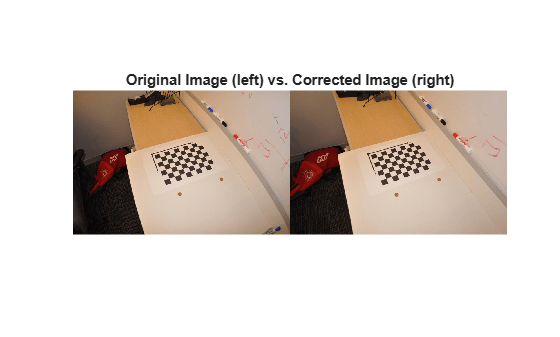
References
[1]
[2]
Extended Capabilities
Version History
Introduced in R2014aSee Also
Apps
Classes
stereoParameters|cameraCalibrationErrors|intrinsicsEstimationErrors|extrinsicsEstimationErrors|cameraIntrinsics

