Dense 3-D Reconstruction of Asteroid Surface from Image Sequence
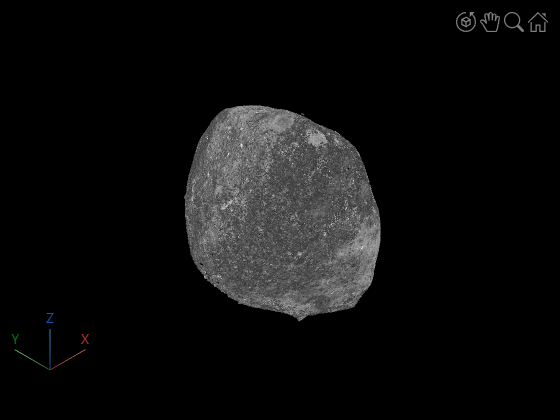
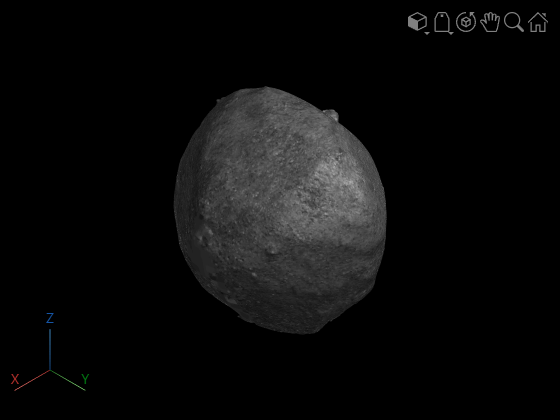
This example shows how to reconstruct a dense 3-D model of an asteroid from a sequence of images captured by NASA’s OSIRIS-REx spacecraft during its approach to the asteroid Bennu [1]. The workflow demonstrates a complete dense reconstruction pipeline using only RGB imagery. Starting with the camera intrinsics and the image sequence, the example first performs incremental structure-from-motion (SfM) to estimate camera poses, a view graph, and a sparse 3-D reconstruction. Dense optical flow from the RAFT deep learning model is then used to compute depth maps between overlapping views, which are filtered and combined to form a dense colored point cloud of the asteroid surface. Finally, Poisson surface reconstruction is applied to generate a smooth, watertight 3-D mesh suitable for visualization and further analysis.
Download Images
This example uses a subset of the OSIRIS-REx Camera Suite (OCAMS) Bundle [1] containing 37 images of the surface of the asteroid Bennu. You can download the data to a temporary directory using a web browser or by running the following code:
% Location of the compressed data set
url = "https://ssd.mathworks.com/supportfiles/3DReconstruction/Bennu_preliminary_survey.zip";

% Store the data set in a temporary folder
downloadFolder = tempdir;
filename = fullfile(downloadFolder, "Bennu_preliminary_survey.zip");

% Uncompressed data set
imageFolder = fullfile(downloadFolder, "Bennu_preliminary_survey");

if ~exist(imageFolder, "dir") % download only once
    disp('Downloading Asteroid Dataset (15 MB)...');
    websave(filename, url);
    unzip(filename, downloadFolder);
end
Create an image datastore to load the images of the asteroid.
imds = imageDatastore(imageFolder);
The images are captured by the MapCam Camera in the OSIRIS-REX Camera Suite. MapCam has an effective focal length of 125 mm [2]. Convert this focal length into pixel units and create a cameraIntrinsicsToOpenCV object to store the intrinsic parameters of the camera.
pixelSize = 8.5e-3; % in millimeters
focalLength = 125/pixelSize;
intrinsics = cameraIntrinsics([focalLength, focalLength], [512, 512], [1024, 1024]);
Display sample images.
figure
montage(imds, Size=[4 4])
title("Sample Images")
truesize;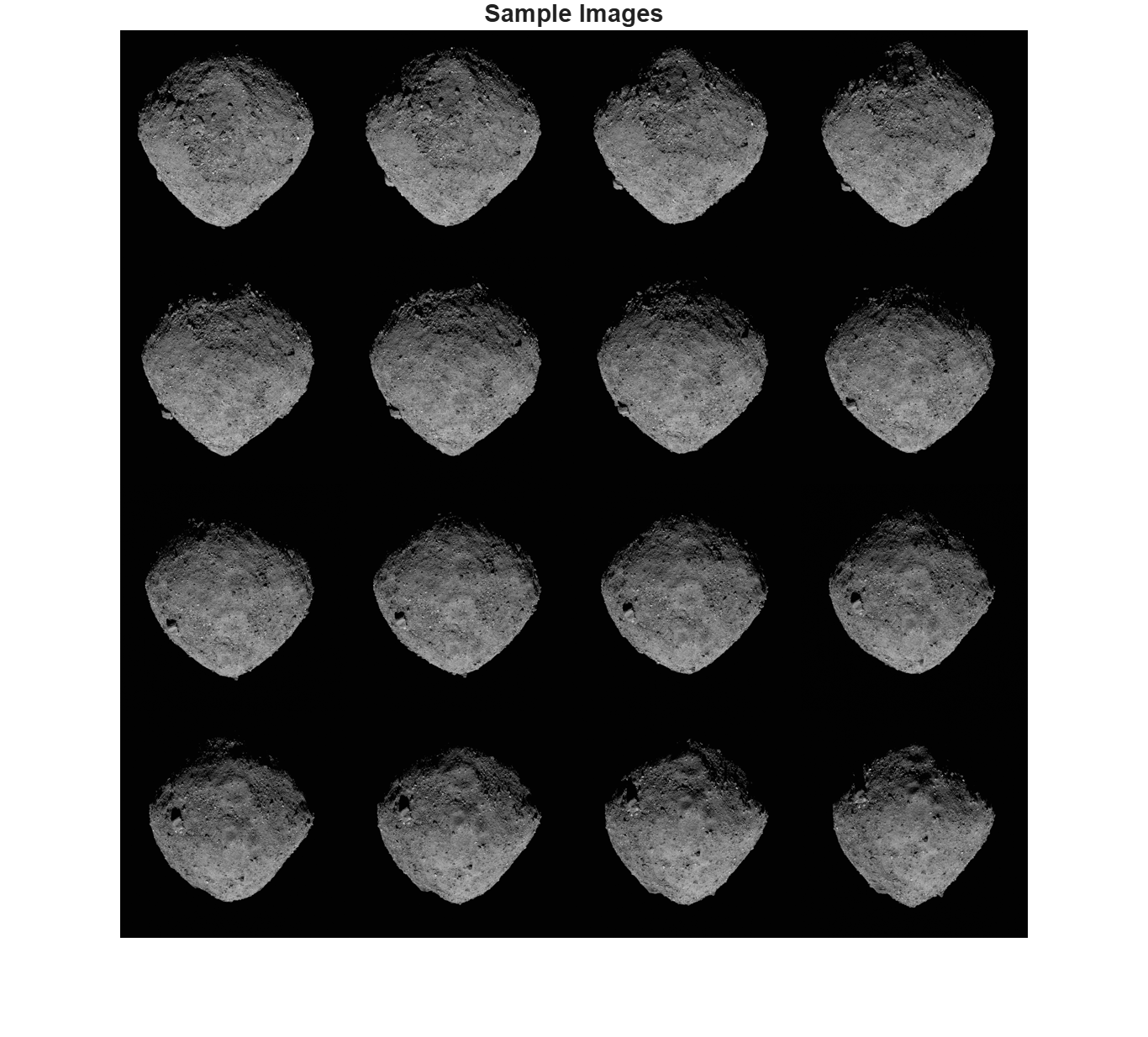
Sparse Reconstruction Using Structure from Motion
Reconstruct a sparse structure of the asteroid from the images using SfM. See the Structure from Motion from Multiple Views example for more in-depth exploration of the pipeline. NumSimilarImages controls how many visually similar images are connected in the view graph. Larger values increase connectivity but also computation. For small datasets, 10–20 is typical. For large datasets, you may need 30–50. This pipeline can take 10-15 minutes to complete.
viewGraph = helperCreateViewGraph(imds, NumSimilarImages=20);
viewGraph = helperRefineViewGraph(viewGraph, intrinsics);
Starting parallel pool (parpool) using the 'Processes' profile ...
Connected to parallel pool with 6 workers.
[viewGraph, wpSet] = helperReconstructFromInitialPairView(viewGraph, intrinsics);
[viewGraph, wpSet, point3dColors] = helperIncrementalSfM(viewGraph, wpSet, intrinsics, imds, Visualization=false, Verbose=true);
17145 point tracks are found.
3 out of 37 views are processed.
4 out of 37 views are processed.
5 out of 37 views are processed.
6 out of 37 views are processed.
7 out of 37 views are processed.
8 out of 37 views are processed.
9 out of 37 views are processed.
10 out of 37 views are processed.
11 out of 37 views are processed.
12 out of 37 views are processed.
13 out of 37 views are processed.
14 out of 37 views are processed.
15 out of 37 views are processed.
16 out of 37 views are processed.
17 out of 37 views are processed.
18 out of 37 views are processed.
19 out of 37 views are processed.
20 out of 37 views are processed.
21 out of 37 views are processed.
22 out of 37 views are processed.
23 out of 37 views are processed.
24 out of 37 views are processed.
25 out of 37 views are processed.
26 out of 37 views are processed.
27 out of 37 views are processed.
28 out of 37 views are processed.
29 out of 37 views are processed.
30 out of 37 views are processed.
31 out of 37 views are processed.
32 out of 37 views are processed.
33 out of 37 views are processed.
34 out of 37 views are processed.
35 out of 37 views are processed.
36 out of 37 views are processed.
37 out of 37 views are processed.
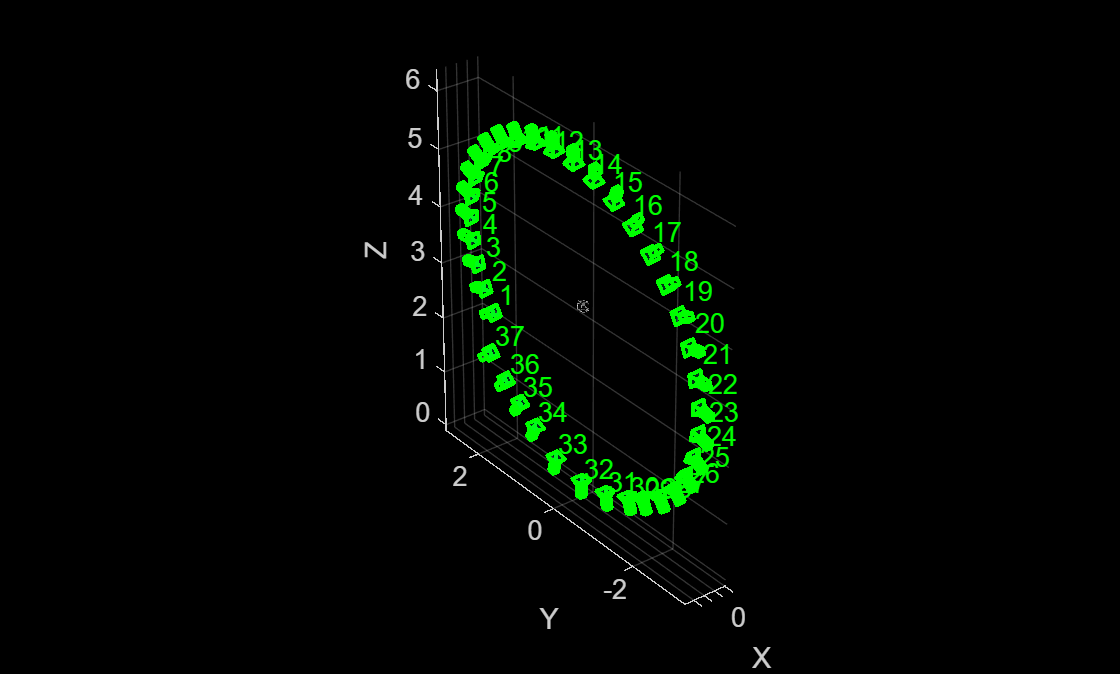
The viewGraph stores camera poses, feature points, descriptors for each view, and geometrically verified matched feature pairs between similar images. The wpSet contains the 3-D points triangulated from the views and the correspondences between these points and the feature points in each view. The cameras appear to follow a "spiral trajectory" because the camera was approaching the asteroid while it was spinning.
figure
pcshow(wpSet.WorldPoints, point3dColors);
xlabel("X")
ylabel("Y")
zlabel("Z")
hold on
camPoses = poses(viewGraph);
plotCamera(camPoses, Color="green", Size=0.1, Opacity=0.1);
View Selection for Dense Depth Estimation
Instantiate an opticalFlowRAFT model for computing dense pixel correspondences between image pairs.
raft = opticalFlowRAFT;
For each view in the image collection, select its best neighboring view for dense reconstruction. Dense reconstruction depends on finding pixel-wise matches between two images and then triangulating to obtain 3D points in world-coordinates for each of the matched pixels. A numerically stable triangulation computation requires the two views to have sufficient viewpoint variation between the two camera positions, along with a minimum number of mutually visible image features.
The minOverlap threshold rejects view pairs that are too far apart and do not share common features. The ideal value is dataset dependent and has to be tuned to obtain a reasonable number of pairs covering multiple view points for subsequent dense reconstruction. Reduce this threshold to consider more image pairs as valid for dense depth estimation. More fine-grained control of the view selection process can be performed by modifying the default values specified in the included supporting function helperSelectDepthViewPairs.
minOverlap = 0.3;
validViewPairs = helperSelectDepthViewPairs(viewGraph, wpSet, minOverlap);

numValidViewPairs = size(validViewPairs,1);
numViews = viewGraph.NumViews;
numImages = length(imds.Files);
numConn = viewGraph.NumConnections;
disp(numValidViewPairs + " valid views out of " + numViews+".");
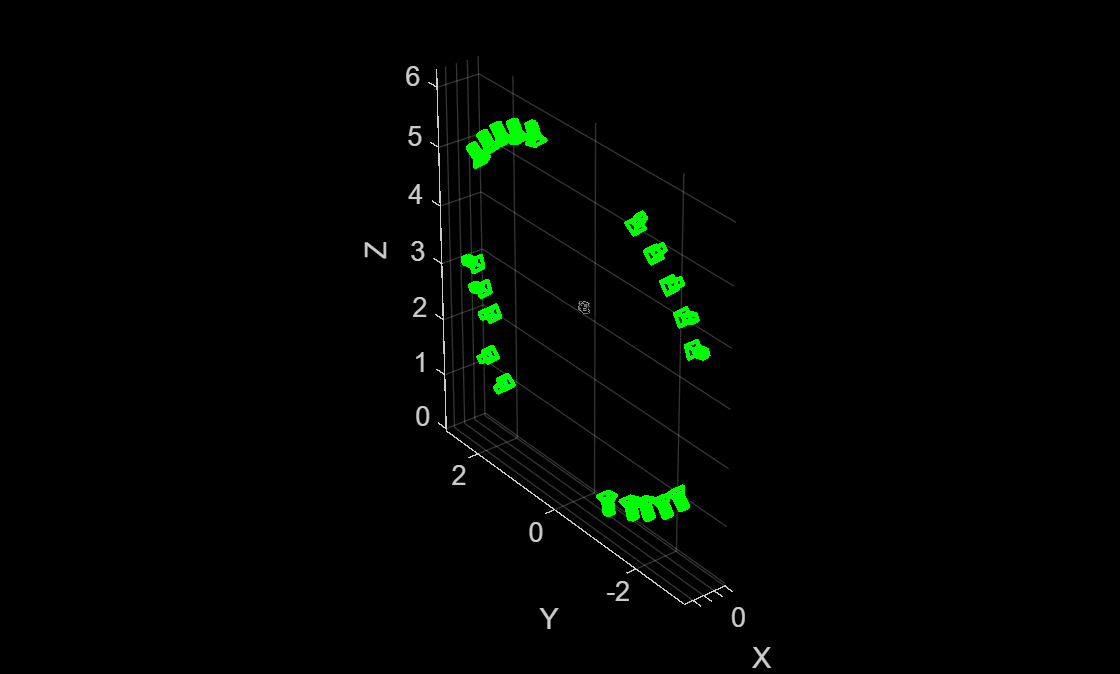
20 valid views out of 37.
Visualize Views Selected for Dense Reconstruction
Visualize the selected views, along with the sparse 3D points from SfM, to ensure that the object of interest is being captured from multiple view points.
figure
pcshow(wpSet.WorldPoints, point3dColors);
xlabel("X")
ylabel("Y")
zlabel("Z")
hold on
for i = 1:numValidViewPairs
    viewId = validViewPairs(i,1);
plotCamera(AbsolutePose=viewGraph.Views.AbsolutePose(viewId), Color="green", Size=0.1, Opacity=0.1);
end
hold off
Estimate Depth Map from Image Pair
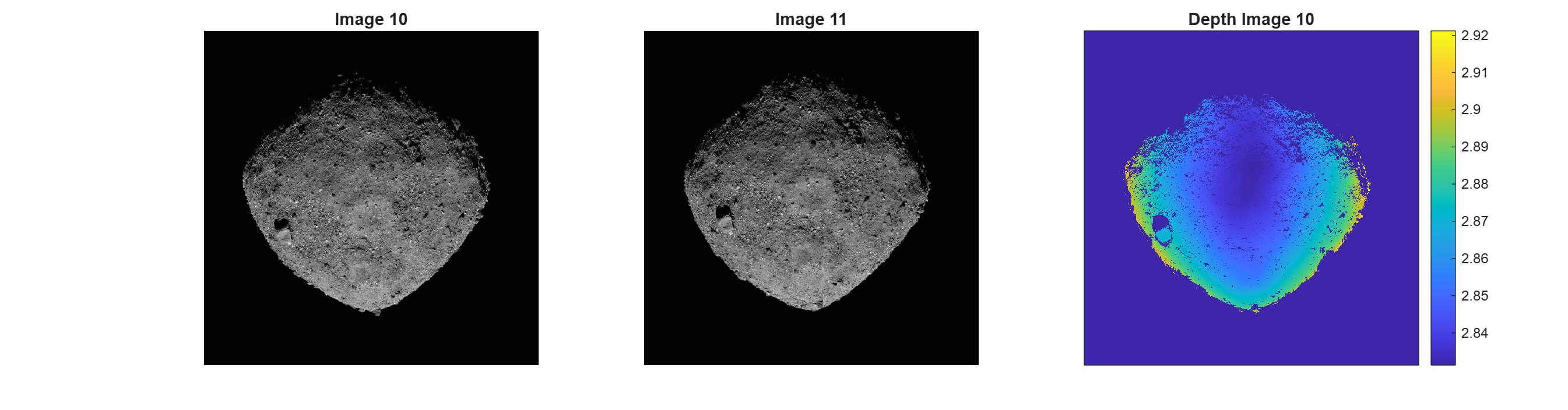
Use the slider to select a particular image pair index, pairIndex, and compute a depth map of the first image using dense optical flow and triangulation from relative camera pose.
pairIndex =6; maxDepthThreshold = 5; % reject depth at points that are too far away to be estimated correctly viewPair = validViewPairs(pairIndex,:);
Extract 3D World Points seen in view1 from the SfM results.
[pointIndices, featureIndices] = findWorldPointsInView(wpSet, viewPair(1));
xyzPoints = wpSet.WorldPoints(pointIndices,:);
Extract 2D keypoints detected in view1 from the SfM results.
view1 = findView(viewGraph, viewPair(1));
view2 = findView(viewGraph, viewPair(2));
featurePoints = view1.Points{:}(featureIndices);
Load the two images.
I1 = readimage(imds, viewPair(1));
I2 = readimage(imds, viewPair(2));
Compute relative pose between camera positions of the two views.
pose1 = view1.AbsolutePose;
pose2 = view2.AbsolutePose;
p1Inv = invert(pose1);
relPose = p1Inv.A * pose2.A;
relPose = rigidtform3d(relPose);
Compute depth map using dense pixel correspondences from optical flow and the relative camera pose between two views.
[depthMap, flow, isValid] = helperComputeDepthMap(...
    raft, I1, I2, relPose, intrinsics, featurePoints, maxDepthThreshold);
Scale the estimated depth map values to the same coordinates as the sparse SfM keypoints.
scaleFactor = helperComputeDepthMapScale(featurePoints,pose1,xyzPoints,depthMap);
depthMap = scaleFactor * depthMap;
Use graythresh and imbinarize to compute a binarization mask on I1 and apply to the depth map. Since the background is black and visible parts of the asteroid are strongly illuminated in this image sequence, thresholding the image removes most of the background areas.
I1Gray = im2gray(I1);
otsuT = graythresh(I1Gray);
BW = imbinarize(I1Gray,otsuT);
depthMap(BW==0) = nan;
Visualize the two images and the estimated depth map. Invalid depth map pixels are marked using NaN values.
figure
subplot(1,3,1)
imshow(I1)
title("Image " + viewPair(1))
subplot(1,3,2)
imshow(I2)
title("Image " + viewPair(2))
subplot(1,3,3)
imagesc(depthMap)
axis image
colorbar
xticks([])
yticks([])
title("Depth Image " + viewPair(1))
truesize;
Dense Reconstruction on Entire Image Sequence
Run on all the valid image pairs in the image sequence and reconstruct a dense point cloud. The code below implements a simple and straightforward approach that accumulates all the two-view reconstructions from all the selected views, along with their color or intensity information, into a single point cloud. Depth estimates at the image boundaries are often inconsistent and are pruned out. Depth values for extremely distant points are also error prone and are discarded. The maximum threshold on the acceptable depth values is data dependent and can be chosen based on visual inspection of the visualized depth map.
This step takes about 8 minutes on a Linux machine with an NVIDIA GeForce RTX 3090 GPU.
% Specify parameters
offset = 50;                         % Ignore image points at the image boundary
depthRange = [0 maxDepthThreshold];  % Ignore depth values that are too far away

ptCloudsFull = {};
imageSize = size(I1);
[X, Y] = meshgrid(offset:2:imageSize(2)-offset, offset:2:imageSize(1)-offset);
numNan = 0;
depthFactor = 1;

for i = 1:numValidViewPairs
    viewPair = validViewPairs(i,:);

    fprintf(i + "/" + numValidViewPairs + " ");

    I1 = readimage(imds, viewPair(1));
    I2 = readimage(imds, viewPair(2));

    view1 = findView(viewGraph, viewPair(1));
    view2 = findView(viewGraph, viewPair(2));

    % 3D world points visible from view1
    [pointIndices, featureIndices] = findWorldPointsInView(wpSet, viewPair(1));
    xyzPoints = wpSet.WorldPoints(pointIndices,:);

    % 2D keypoints for visible world points in view1
    featurePoints = view1.Points{:}(featureIndices);

    % Camera poses of the two views
    pose1 = view1.AbsolutePose;
    pose2 = view2.AbsolutePose;

    % Compute relative pose between cameras
    p1Inv = invert(pose1);
    relPose = p1Inv.A * pose2.A;
    relPose = rigidtform3d(relPose);

    % Compute depth map using dense pixel correspondences from optical flow
    % and relative camera pose between two views from SfM.
    [depthMap, flow, isValid] = helperComputeDepthMap(...
        raft, I1, I2, relPose, intrinsics, featurePoints, maxDepthThreshold);

    if ~isValid
        disp("Numerically unstable depth estimation.")
        numNan = numNan + 1;
        continue;
    end

    % Scale the estimated depth map values to the same coordinates as the
    % sparse SfM keypoints.
    scaleFactor = helperComputeDepthMapScale(featurePoints,pose1,xyzPoints,depthMap);
    depthMap = scaleFactor * depthMap;

    % Foreground selection- compute a binarization mask on I1 and apply to
    % the depth map.
    I1Gray = im2gray(I1);
    otsuT = graythresh(I1Gray);
    BW = imbinarize(I1Gray,otsuT);
    depthMap(BW==0) = nan;

    [xyzPoints, validIndex] = helperReconstructFromRGBD([X(:), Y(:)], ...
        depthMap, intrinsics, pose1, depthFactor, depthRange);

    colors = zeros(numel(X), 1, 'like', I1);
    for j = 1:numel(X)
        colors(j, 1:3) = I1(Y(j), X(j), :);
    end
    ptCloudsFull{end+1} = pointCloud(xyzPoints, Color=colors(validIndex, :));

end
1/20 2/20 3/20 4/20 5/20 6/20 7/20 8/20 9/20 10/20 11/20 12/20 13/20 14/20 15/20 16/20 17/20 18/20 19/20 20/20
Aggregate Reconstructed Point Clouds
Merge the point clouds into a single point cloud by using the pccat function.
ptCloudsMerged = pccat(cat(1,ptCloudsFull{:}));Apply a denoising step on the point cloud by using the pcdenoise function.
ptCloudsMerged = pcdenoise(ptCloudsMerged);
Visualize the point cloud using pcviewer.
figure
pcviewer(ptCloudsMerged)
Compute Surface Mesh from Dense Point Cloud
After generating a dense colored point cloud from the input images, you can convert it into a continuous 3-D surface mesh using Poisson surface reconstruction by using the pc2surfacemesh (Lidar Toolbox) function. The resulting mesh provides a smooth, topologically consistent representation of the asteroid, suitable for visualization, measurement, and further geometric analysis. This step can take several minutes to complete due to the large size of the point cloud being meshed. This step takes 4-5 minutes.
[mesh,depth,perVertexDensity] = pc2surfacemesh(ptCloudsMerged,"poisson");Display the reconstructed surface mesh.
viewer = viewer3d(BackgroundColor="black",BackgroundGradient="off",RenderingQuality="high");
surfaceMeshShow(mesh, Parent=viewer);
References
[1] OSIRIS-REx Camera Suite (OCAMS) Bundle https://arcnav.psi.edu/urn:nasa:pds:orex.ocams
[2] ORX OCAMS Instrument Kernel https://naif.jpl.nasa.gov/pub/naif/ORX/kernels/ik/orx_ocams_v04.ti
See Also
imageviewset | worldpointset | opticalFlowRAFT | findWorldPointsInView | pc2surfacemesh (Lidar Toolbox)

