wirelessNetworkSimulator
Description
The wirelessNetworkSimulator object simulates different
wireless network scenarios with different types of wireless nodes. Use the object functions to
add nodes to the simulator, interact with the nodes, schedule actions to perform during
simulation, plug in custom channel models, and run simulations.
Creation
Description
networkSimulator = wirelessNetworkSimulator.initwirelessNetworkSimulator object with default property values.
If the wirelessNetworkSimulator object
networkSimulator already exists in the MATLAB® workspace, the function resets the object to its default state.
Note
Call wirelessNetworkSimulator.init before creating any nodes.
Each new node receives a unique positive integer as its node ID. When you call
wirelessNetworkSimulator.init, the node ID counter
resets.
Properties
Object Functions
wirelessNetworkSimulator.getInstance | Get instance of wirelessNetworkSimulator object |
addNodes | Add nodes to simulator |
addChannelModel | Add custom channel or path loss model |
scheduleAction | Schedule action to perform during simulation |
cancelAction | Cancel scheduled action |
run | Run simulation |
schedulePreSimulationAction | Schedule pre-simulation action |
schedulePostSimulationAction | Schedule post-simulation action |
Examples
Create a wirelessNetworkSimulator object by using the wirelessNetworkSimulator.init() function. By default, the wirelessNetworkSimulator object applies free-space path loss model for the channel effects.
networkSimulator = wirelessNetworkSimulator.init();
Create two Bluetooth BR nodes, one with the "central" role and other with the "peripheral" role. Specify the position of the Peripheral node in meters.
centralNode = bluetoothNode("central");
peripheralNode = bluetoothNode("peripheral",Position=[1 0 0]);
Create a default Bluetooth BR connection configuration object to configure and share a connection between Bluetooth BR Central and Peripheral nodes.
cfgConnection = bluetoothConnectionConfig;
Configure connection between the Central and the Peripheral nodes.
connection = configureConnection( ...
    cfgConnection,centralNode,peripheralNode);
Create and configure a networkTrafficOnOff object to generate an On-Off application traffic pattern.
traffic = networkTrafficOnOff( ...
    DataRate=200, ...
    PacketSize=27, ...
    OnTime=inf);
Add application traffic from the Central to the Peripheral node.
addTrafficSource(centralNode,traffic, ...
    DestinationNode=peripheralNode);
Add the Central and Peripheral nodes to the wireless network simulator.
addNodes(networkSimulator,[centralNode peripheralNode]);
Specify the simulation time in seconds.
simulationTime = 0.05;
Run the simulation for the specified simulation time.
run(networkSimulator,simulationTime);
Retrieve application, baseband, and physical layer (PHY) statistics corresponding to the Central and Peripheral nodes.
centralStats = statistics(centralNode)
centralStats = struct with fields:
        Name: "Node1"
          ID: 1
         App: [1×1 struct]
    Baseband: [1×1 struct]
         PHY: [1×1 struct]
peripheralStats = statistics(peripheralNode)
peripheralStats = struct with fields:
        Name: "Node2"
          ID: 2
         App: [1×1 struct]
    Baseband: [1×1 struct]
         PHY: [1×1 struct]
Create a wirelessNetworkSimulator object.
networkSimulator = wirelessNetworkSimulator.init();
Create two Bluetooth BR nodes, one with the "central" role and other with the "peripheral" role. Specify the position of the Peripheral node in meters.
centralNode = bluetoothNode("central");
peripheralNode = bluetoothNode("peripheral",Position=[1 0 0]);
Create a default Bluetooth BR connection configuration object to configure and share a connection between Bluetooth BR Central and Peripheral nodes.
cfgConnection = bluetoothConnectionConfig;
Configure connection between the Central and the Peripheral nodes.
connection = configureConnection(cfgConnection,centralNode,peripheralNode);
Create and configure a networkTrafficOnOff object to generate an On-Off application traffic pattern.
traffic = networkTrafficOnOff(DataRate=200,PacketSize=27,OnTime=inf);
Add application traffic from the Central to the Peripheral node.
addTrafficSource(centralNode,traffic, ...
    DestinationNode=peripheralNode);
Add the Central and Peripheral nodes to the wireless network simulator.
addNodes(networkSimulator,[centralNode peripheralNode]);
By default, the wirelessNetworkSimulator object applies free-space path loss model for the channel effects. You can add custom channel effects by using the addChannelModel function. However, to model the channel without any channel effects, specify a custom MATLAB™ function, removeChannelEffect, in which the input transmitted packets are returned at the output without any changes.
addChannelModel(networkSimulator,@removeChannelEffect);
Specify the simulation time in seconds.
simulationTime = 0.05;
Run the simulation for the specified simulation time.
run(networkSimulator,simulationTime);
Retrieve application, baseband, and physical layer (PHY) statistics corresponding to the Central and Peripheral nodes.
centralStats = statistics(centralNode)
centralStats = struct with fields:
        Name: "Node1"
          ID: 1
         App: [1×1 struct]
    Baseband: [1×1 struct]
         PHY: [1×1 struct]
peripheralStats = statistics(peripheralNode)
peripheralStats = struct with fields:
        Name: "Node2"
          ID: 2
         App: [1×1 struct]
    Baseband: [1×1 struct]
         PHY: [1×1 struct]
function outputData = removeChannelEffect(~,txData)
outputData = txData;
end
This example shows how to create, configure, and simulate an IEEE® 802.11ax™ (Wi-Fi 6) mesh network.
Using this example, you can:
Create and configure an 802.11ax mesh network consisting of four mesh nodes.
Generate, configure, and add on-off application traffic between the mesh nodes.
Add mesh paths to route application traffic from the source node to the sink node.
Simulate the 802.11ax mesh network and visualize the statistics.
The example simulates this mesh network scenario.
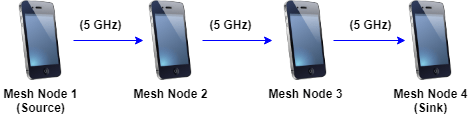
The mesh node 1 (source) generates and transmits application traffic to mesh node 4 (sink) through intermediate relay nodes, mesh node 2, and mesh node 3. The example simulates mesh network communication in the 5 GHz band.
Set the seed for the random number generator to 1. The seed value controls the pattern of random number generation. The random number generated by the seed value impacts several processes within the simulation including backoff counter selection at the MAC layer and predicting packet reception success at the physical layer. To improve the accuracy of your simulation results, after running the simulation, you can change the seed value, run the simulation again, and average the results over multiple simulations.
rng(1,"combRecursive");Specify the simulation time in seconds.
simulationTime = 0.5;
Initialize the wireless network simulator.
networkSimulator = wirelessNetworkSimulator.init;
Specify the names and positions of the mesh nodes.
nodeNames = ["MeshNode1","MeshNode2","MeshNode3","MeshNode4"];
nodePositions = [10 0 0; 20 0 0; 30 0 0; 40 0 0];              % x-, y-, and z-coordinates, in meters
Set the configuration parameters of the mesh nodes by using the wlanDeviceConfig (WLAN Toolbox) object.
meshNodeCfg = wlanDeviceConfig(Mode="mesh",BandAndChannel=[5 36],MCS=7,TransmitPower=15);Create the mesh nodes from the specified configuration by using the wlanNode (WLAN Toolbox) object.
meshNodes = wlanNode(Name=nodeNames, ...
    Position=nodePositions, ...
    DeviceConfig=meshNodeCfg);
Generate an on-off application traffic pattern by using the networkTrafficOnOff object. Configure the on-off application traffic by specifying the application data rate and packet size. Add application traffic from mesh node 1 to mesh node 4.
trafficSource = networkTrafficOnOff(DataRate=50000,PacketSize=1500);
addTrafficSource(meshNodes(1),trafficSource,DestinationNode=meshNodes(4));
Add mesh paths to propagate the application traffic from the source mesh node 1 to the destination mesh node 4. The application traffic flows from mesh node 1 to mesh node 4 through the intermediate relay nodes mesh node 2 and mesh node 3.
addMeshPath(meshNodes(1),meshNodes(4),meshNodes(2));
addMeshPath(meshNodes(2),meshNodes(4),meshNodes(3));
addMeshPath(meshNodes(3),meshNodes(4));
Add nodes to the wireless network simulator.
addNodes(networkSimulator,meshNodes);
Run the network simulation for the specified simulation time.
run(networkSimulator,simulationTime);
At each mesh node, the simulation captures the statistics by using the statistics object function. The stats variable captures the application statistics, MAC layer statistics, physical layer statistics, and mesh forwarding statistics for each node. For more information about these statistics, see the WLAN System-Level Simulation Statistics (WLAN Toolbox) topic.
stats = statistics(meshNodes)
stats=1×4 struct array with fields:
    Name
    ID
    App
    MAC
    PHY
    Mesh
Initialize wireless network simulator.
networkSimulator = wirelessNetworkSimulator.init;
Create a gNB node with these specifications.
Duplex mode — Time division duplex
Channel bandwidth — 20 MHz
Subcarrier spacing — 30 KHz
gnb = nrGNB(ChannelBandwidth=20e6,DuplexMode="TDD",SubcarrierSpacing=30e3);Create a UE node with a transmit power of 20 dBm.
ue = nrUE(TransmitPower=20);
Add a random way point mobility model to the UE node.
addMobility(ue,BoundaryShape="rectangle")Establish a connection between the UE and gNB nodes.
connectUE(gnb,ue)
Create a voice over Internet protocol (VoIP) application traffic pattern object.
traffic = networkTrafficVoIP;
Add the data traffic source to the gNB node. Set the destination node as the UE node.
addTrafficSource(gnb,traffic,DestinationNode=ue)
Add the gNB node to the wireless network simulator.
addNodes(networkSimulator,gnb)
Add the UE node to the wireless network simulator.
addNodes(networkSimulator,ue)
Specify the simulation time, in seconds.
simulationTime = 0.3;
Run the simulation for the specified simulation time.
run(networkSimulator,simulationTime)
Obtain the statistics for the gNB and UE nodes.
gnbStats = statistics(gnb);
ueStats = statistics(ue);
Version History
Introduced in R2022bSee Also
Objects
Topics
- Wireless Network Simulator
- Plug Custom Channel into Wireless Network Simulator
- Create, Configure, and Simulate Bluetooth BR/EDR Piconet (Bluetooth Toolbox)
- Bluetooth BR/EDR Data and Voice Communication with WLAN Signal Interference (Bluetooth Toolbox)
- Simulate Multiple Bluetooth BR/EDR Piconets with ACL Traffic (Bluetooth Toolbox)

