dsp.FIRFilter
Static or time-varying FIR filter
Description
The dsp.FIRFilter
System object™ filters each channel of the input using static or time-varying FIR filter
implementations.
To filter each channel of the input:
Create the
dsp.FIRFilterobject and set its properties.Call the object with arguments, as if it were a function.
To learn more about how System objects work, see What Are System Objects?
This object supports C/C++ code generation and SIMD code generation under certain conditions. For more information, see Code Generation.
Creation
Syntax
Description
returns a finite impulse
response (FIR) filter object, fir = dsp.FIRFilterfir, which independently filters each
channel of the input over time using a specified FIR filter implementation.
returns an FIR filter System object, fir = dsp.FIRFilter(num)fir, with the Numerator property
set to num.
specifies the input sample rate as a positive real scalar or
fir = dsp.FIRFilter(___,SampleRate=Value)"normalized". (since R2026a)
To specify an input sample rate of 22050 Hz, set
SampleRate to 22050. To specify the input sample rate in normalized
units, set SampleRate to "normalized". (since R2026a)
sets properties using one or more name-value arguments. For example, to specify the
initial conditions for the FIR filter as 3, set fir = dsp.FIRFilter(___,PropertyName=Value)InitialConditions to
3.
Properties
Unless otherwise indicated, properties are nontunable, which means you cannot change their
values after calling the object. Objects lock when you call them, and the
release function unlocks them.
If a property is tunable, you can change its value at any time.
For more information on changing property values, see System Design in MATLAB Using System Objects.
Filter structure, specified as one of these:
"Direct form""Direct form symmetric""Direct form antisymmetric""Direct form transposed""Lattice MA"
Source of the filter coefficients, specified as one of these:
"Property"— Specify the filter coefficients using theNumeratorproperty."Input port"— Specify the filter coefficients through thecoeffinput. The filter object updates the time-varying filter once every frame.
Dependencies
This applies when you set the Structure
to "Direct form", "Direct form
symmetric", "Direct form
antisymmetric", or "Direct form
transposed".
Source of the lattice filter coefficients, specified as one of these:
"Property"— Specify the filter coefficients using theReflectionCoefficientsproperty."Input port"— Specify the filter coefficients through thecoeffinput. The filter object updates the time-varying filter once every frame.
Dependencies
This applies when you set the Structure to "Lattice
MA".
Numerator coefficients, specified as a row vector.
Tunable: Yes
Dependencies
This property applies when you set the
NumeratorSource property to
"Property", and the Structure property is set to
"Direct form", "Direct form
symmetric", "Direct form
antisymmetric", or "Direct form
transposed".
Data Types: single | double | int8 | int16 | int32 | int64 | uint8 | uint16 | uint32 | uint64
Complex Number Support: Yes
Reflection coefficients of lattice filter, specified as a row vector.
Tunable: Yes
Dependencies
This property applies when you set the Structure property to
"Lattice MA", and the
ReflectionCoefficientsSource property to
"Property".
Data Types: single | double | int8 | int16 | int32 | int64 | uint8 | uint16 | uint32 | uint64
Complex Number Support: Yes
Initial conditions of filter states for the FIR filter, specified as a scalar, vector, or a matrix.
The number of states or delay elements equals the number of reflection coefficients for the lattice structure, or the number of filter coefficients–1 for the other direct form structures.
You can specify the initial conditions as a scalar, vector, or matrix. If you specify a scalar value, the FIR filter object initializes all delay elements in the filter to that value. If you specify a vector whose length equals the number of delay elements in the filter, each vector element specifies a unique initial condition for the corresponding delay element. The object applies the same vector of initial conditions to each channel of the input signal.
If you specify a vector whose length equals the product of the number of input channels and the number of delay elements in the filter, each element specifies a unique initial condition for the corresponding delay element in the corresponding channel.
If you specify a matrix with the same number of rows as the number of delay elements in the filter, and one column for each channel of the input signal, each element specifies a unique initial condition for the corresponding delay element in the corresponding channel.
Tunable: Yes
Data Types: single | double | int8 | int16 | int32 | int64 | uint8 | uint16 | uint32 | uint64
Fixed-Point Properties
Specify whether to use full precision rules. If you set
FullPrecisionOverride to
true, which is the default, the object
computes all internal arithmetic and output data types using full
precision rules. These rules provide the most accurate fixed-point
numerics. It also turns off the display of other fixed-point
properties because they do not apply individually. These rules
guarantee that no quantization occurs within the object. Bits are
added, as needed, to ensure that no roundoff or overflow occurs.
If you set FullPrecisionOverride to
false, fixed-point data types are controlled
through individual fixed-point property settings. For more
information, see Full Precision for Fixed-Point System Objects.
Rounding method for fixed-point operations, specified as one of these:
"Floor""Ceiling""Convergent""Nearest""Round""Simplest""Zero"
Dependencies
This property applies only if the object is not in full precision mode.
Overflow action for fixed-point operations, specified as "Wrap"
or "Saturate".
Dependencies
This property applies only if the object is not in full precision mode.
Specify the coefficients fixed-point data type as
"Same word length as input" or
"Custom".
Dependencies
This property applies when you set the
NumeratorSource property to
"Property".
Specify the coefficients fixed-point type as a signed or unsigned numerictype (Fixed-Point Designer) object.
Dependencies
This property applies when you set the
CoefficientsDataType property to
"Custom".
Specify the reflection coefficients fixed-point data type as
"Same word length as input" or
"Custom".
Dependencies
This property applies when you set the
ReflectionCoefficientsSource property to
"Property".
Specify the reflection coefficients fixed-point type as a signed or unsigned
numerictype (Fixed-Point Designer) object.
Dependencies
This property applies when you set the
ReflectionCoefficientsDataType property
to "Custom".
Specify the product fixed-point data type as "Full
precision", "Same as input", or
"Custom".
Specify the product fixed-point type as a signed or unsigned scaled numerictype (Fixed-Point Designer) object.
Dependencies
This property applies when you set the
ProductDataType property to
"Custom".
Specify the accumulator fixed-point data type to
"Full precision", "Same as
input", "Same as product", or
"Custom".
Specify the accumulator fixed-point type as a signed or unsigned scaled numerictype (Fixed-Point Designer) object.
Dependencies
This property applies when you set the
AccumulatorDataType property to
"Custom".
Specify the state fixed-point data type as one of
"Same as input", "Same as
accumulator", or "Custom".
Dependencies
This property does not apply to any of the direct form or direct form I filter structures.
Specify the state fixed-point type as a signed or unsigned scaled numerictype (Fixed-Point Designer) object.
Dependencies
This property applies when you set the
StateDataType property to
"Custom".
Specify the output fixed-point data type as one of
"Same as input", "Same as
accumulator", or "Custom".
Specify the output fixed-point type as a signed or unsigned scaled numerictype (Fixed-Point Designer) object.
Dependencies
This property applies when you set the OutputDataType property to
Custom.
Usage
Description
Input Arguments
Data input, specified as a vector or a matrix. When the input
data is of a fixed-point type, it must be signed when the
structure is set to "Direct form symmetric" or
"Direct form antisymmetric". The FIR filter
object operates on each channel of the input signal independently
over successive calls to the object.
This System object supports variable-size input.
Data Types: single | double | int8 | int16 | int32 | uint8 | uint16 | uint32 | fi
Complex Number Support: Yes
Time-varying filter coefficients, specified as a row vector. The data and coefficient inputs must have the same data type.
Data Types: single | double | int8 | int16 | int32 | uint8 | uint16 | uint32 | fi
Complex Number Support: Yes
Output Arguments
Filtered output, returned as a vector or a matrix. The output has the same size as
the input. For single and double inputs, the
output data type matches the input data type. For integer and fixed-point inputs, the
output data type depends on the setting of the
FullPrecisionOverride and OutputDataType
properties.
Data Types: single | double | int8 | int16 | int32 | uint8 | uint16 | uint32 | fi
Complex Number Support: Yes
Object Functions
To use an object function, specify the
System object as the first input argument. For
example, to release system resources of a System object named obj, use
this syntax:
release(obj)
freqz | Frequency response of discrete-time filter System object |
filterAnalyzer | Analyze filters with Filter Analyzer app |
impz | Impulse response of discrete-time filter System object |
info | Information about filter System object |
coeffs | Returns the filter System object coefficients in a structure |
cost | Estimate cost of implementing filter System object |
grpdelay | Group delay response of discrete-time filter System object |
outputDelay | Determine output delay of single-rate or multirate filter |
setInputSampleRate | Specify input sample rate in filter objects |
ctf | Convert digital filter to coefficients in cascaded transfer function format |
Examples
Use an FIR filter to apply a lowpass filter to a waveform with two sinusoidal components.
t = (0:1000)'/8e3; xin = sin(2*pi*0.3e3*t)+sin(2*pi*3e3*t); sr = dsp.SignalSource; sr.Signal = xin; sink = dsp.SignalSink; fir = dsp.FIRFilter(designLowpassFIR(FilterOrder=10,CutoffFrequency=0.5)); sa = spectrumAnalyzer(... SampleRate=8e3,... Method="welch",... PlotAsTwoSidedSpectrum=false,... OverlapPercent=80,... SpectrumUnits="dBW",... YLimits=[-150 -10]); while ~isDone(sr) input = sr(); filteredOutput = fir(input); sink(filteredOutput); sa(filteredOutput) end

filteredResult = sink.Buffer; filterAnalyzer(fir,SampleRates=8000)

Design an FIR filter as a System object.
N = 10; Fc = 0.4; firFiltObj = designLowpassFIR(FilterOrder=N,CutoffFrequency=Fc,SystemObject=true)
firFiltObj =
dsp.FIRFilter with properties:
Structure: 'Direct form'
NumeratorSource: 'Property'
Numerator: [-1.2414e-18 -0.0126 -0.0247 0.0635 0.2748 0.3981 0.2748 0.0635 -0.0247 -0.0126 -1.2414e-18]
InitialConditions: 0
Show all properties
filterAnalyzer(firFiltObj)

Create a dsp.FIRFilter object, and set the NumeratorSource property to "Input port" so that you can vary the coefficients of the FIR filter through the input port during simulation.
firFilt = dsp.FIRFilter(NumeratorSource="Input port")firFilt =
dsp.FIRFilter with properties:
Structure: 'Direct form'
NumeratorSource: 'Input port'
InitialConditions: 0
Show all properties
Create a spectrumAnalyzer object to visualize the spectra of the input and output signals.
spectrumScope = spectrumAnalyzer(SampleRate=44100,PlotAsTwoSidedSpectrum=false,... ChannelNames=["Input Signal","Filtered Signal"]);
Create a dsp.DynamicFilterVisualizer object to visualize the magnitude response of the varying filter.
filterViz = dsp.DynamicFilterVisualizer(NormalizedFrequency=true);
Stream in random data and filter the signal using the dsp.FIRFilter object. Use the designLowpassFIR function to design the filter coefficients. By default, this function returns a vector of FIR filter coefficients. Assign these coefficients to the dsp.FIRFilter object.
Vary the cutoff frequency of the filter during simulation. The designLowpassFIR function redesigns the coefficients based on the updated filter specifications. Pass these updated coefficients to the FIR filter. Visualize the spectra of the input and filtered signals using the spectrum analyzer.
Fcut = 0.5; for idx = 1:500 num = designLowpassFIR(FilterOrder=30,CutoffFrequency=Fcut,Window="hann"); x = randn(1024,1); y = firFilt(x,num); spectrumScope(x,y); filterViz(num,1); Fcut = Fcut + 0.0005; end


Design and implement a lowpass FIR filter object using the designLowpassFIR function. The function returns a dsp.FIRFilter object when you set the SystemObject argument to true. To design the filter in single-precision, use the Datatype or like argument. Alternatively, you can specify any of the numerical arguments in single-precision.
firFilt = designLowpassFIR(FilterOrder=30,CutoffFrequency=0.5,Window="hann",... Datatype="single",SystemObject=true)
firFilt =
dsp.FIRFilter with properties:
Structure: 'Direct form'
NumeratorSource: 'Property'
Numerator: [0 2.1297e-19 0.0011 -1.8613e-18 -0.0048 4.8729e-18 0.0122 -8.7270e-18 -0.0251 1.2757e-17 0.0477 -1.6267e-17 -0.0960 1.8649e-17 0.3148 0.5000 0.3148 1.8649e-17 -0.0960 -1.6267e-17 0.0477 1.2757e-17 -0.0251 … ] (1×31 single)
InitialConditions: 0
Show all properties
Set the input sample rate to 44.1 kHz using the setInputSampleRate function.
setInputSampleRate(firFilt,44100)
Create a dsp.DynamicFilterVisualizer object to visualize the magnitude response of the filter.
filterViz = dsp.DynamicFilterVisualizer; filterViz(firFilt)

Create a spectrumAnalyzer object to visualize the spectra of the input and output signals.
spectrumScope = spectrumAnalyzer(SampleRate=44100,PlotAsTwoSidedSpectrum=false,... ChannelNames=["Input Signal","Filtered Signal"]);
Stream in random data and filter the signal using the dsp.FIRFilter object. Visualize the spectra of the input and filtered signals using the spectrum analyzer.
for idx = 1:500 x = randn(1024,1); y = firFilt(x); spectrumScope(x,y); end

Design an equiripple FIR halfband filter with the order of 24 and a transition width of 0.1 using the designHalfbandFIR function. Assign the filter coefficients to a dsp.FIRFilter System object.
b = designHalfbandFIR(FilterOrder=24,DesignMethod="equiripple");
hbFIR = dsp.FIRFilter(b);Create a dsp.DynamicFilterVisualizer object and visualize the magnitude response of the filter.
dfv = dsp.DynamicFilterVisualizer(NormalizedFrequency=true); dfv(hbFIR);

Create a spectrumAnalyzer object to visualize the spectra of the input and output signals.
scope = spectrumAnalyzer(SampleRate=2, PlotAsTwoSidedSpectrum=false,... ChannelNames=["Input Signal","Filtered Signal"]);
Stream in random data and filter the signal using the FIR halfband filter.
for i = 1:1000 x = randn(1024, 1); y = hbFIR(x); scope(x,y); end

Since R2023b
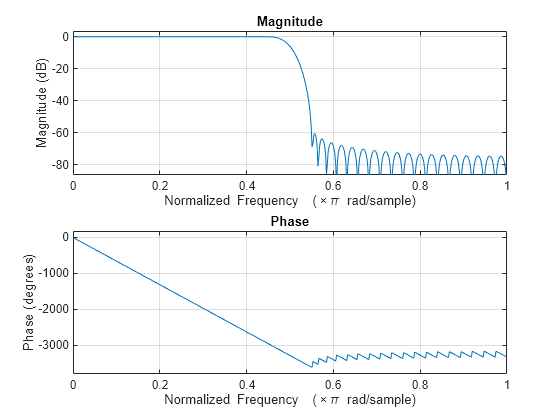
Design a lowpass FIR filter using the designfilt function.
The filter is a minimum order filter with a passband frequency of 0.45 and a stopband frequency of 0.55 in normalized frequency units. The passband ripple is 1 dB and the stopband attenuation is 60 dB. Use the Kaiser window design method and set the SystemObject argument to true.
With these specifications, the designfilt function generates a dsp.FIRFilter System object™.
lpFIRFilter = designfilt("lowpassfir", ... PassbandFrequency=0.45,StopbandFrequency=0.55, ... PassbandRipple=1,StopbandAttenuation=60, ... DesignMethod="kaiserwin",SystemObject=true)
lpFIRFilter =
dsp.FIRFilter with properties:
Structure: 'Direct form'
NumeratorSource: 'Property'
Numerator: [1.2573e-04 -1.9141e-04 -2.7282e-04 3.7207e-04 4.9141e-04 -6.3325e-04 -8.0016e-04 9.9490e-04 0.0012 -0.0015 -0.0018 0.0021 0.0025 -0.0029 -0.0034 0.0040 0.0046 -0.0053 -0.0060 0.0069 0.0079 -0.0090 -0.0102 0.0116 … ] (1×74 double)
InitialConditions: 0
Show all properties
Visualize the magnitude and phase responses of this filter using freqz.
freqz(lpFIRFilter.Numerator)
Since R2026a
Using SampleRate Argument
Specify the input sample rate explicitly while constructing the dsp.FIRFilter object using the SampleRate argument.
firFilt = dsp.FIRFilter(SampleRate=22050)
firFilt =
dsp.FIRFilter with properties:
Structure: 'Direct form'
NumeratorSource: 'Property'
Numerator: [0.5000 0.5000]
InitialConditions: 0
Show all properties
You can view this information using the Input sample rate field of the info function.
info(firFilt)
ans = 7×35 char array
'Discrete-Time FIR Filter (real) '
'------------------------------- '
'Filter Structure : Direct-Form FIR'
'Filter Length : 2 '
'Stable : Yes '
'Linear Phase : Yes (Type 2) '
'Input sample rate : 22050 '
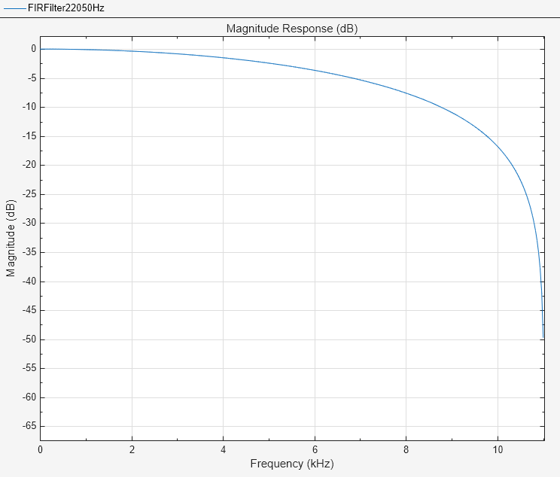
Visualize the frequency response of the filter using filterAnalyzer. Note the frequency range from 0 to 11025 Hz.
filterAnalyzer(firFilt,FilterNames="FIRFilter22050Hz")
Using setInputSampleRate Function
To specify the input sample rate after constructing the object, use the setInputSampleRate function.
setInputSampleRate(firFilt,44100)
To confirm, view the sample rate information using the info function.
info(firFilt)
ans = 7×35 char array
'Discrete-Time FIR Filter (real) '
'------------------------------- '
'Filter Structure : Direct-Form FIR'
'Filter Length : 2 '
'Stable : Yes '
'Linear Phase : Yes (Type 2) '
'Input sample rate : 44100 '
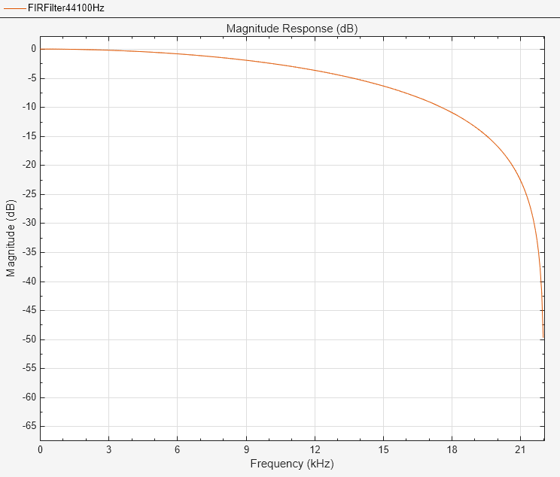
Visualize the frequency response of the filter using filterAnalyzer. Note the change in frequency interval from 0 to 22050 Hz.
filterAnalyzer(firFilt,FilterNames="FIRFilter44100Hz")
Algorithms
This object implements the algorithm, inputs, and outputs described on the Discrete FIR Filter (Simulink) block reference page. The object properties correspond to the block parameters.
Extended Capabilities
Usage notes and limitations:
Only the
Numeratorproperty is tunable for code generation.See System Objects in MATLAB Code Generation (MATLAB Coder).
This functionality requires a MATLAB® Coder™ license and an Embedded Coder® license
The dsp.FIRFilter
System object supports SIMD code generation using Intel® AVX2 code replacement library under these conditions:
Filter structure is set to
"Direct form"or"Direct form transposed".Input signal is real-valued with real filter coefficients.
When the filter structure is set to
"Direct form", the input signal can also be complex-valued with real or complex filter coefficients.Input signal has a data type of
singleordouble.
To generate SIMD code from this object using this workflow, see Use Intel AVX2 Code Replacement Library to Generate SIMD Code from MATLAB Algorithms.
This functionality requires a MATLAB Coder or Embedded Coder license.
You can generate SIMD code for the
dsp.FIRFilter object for the Intel platform and Apple silicon and ARM®
Cortex®-A processors using the InstructionSetExtensions (Simulink Coder) configuration parameter under these
conditions: (since R2026a)
Intel platforms
Input signal data type is
singleordouble.Input signal is real-valued with real filter coefficients.
Filter structure is
"Direct form"or"Direct form transposed".
For more information on this workflow, see Use Target Hardware Instruction Set Extensions to Generate SIMD Code for MATLAB System Objects for Intel Platforms.
ARM Cortex-A processors, Apple silicon processors
This functionality requires an Embedded Coder license.
Input signal data type is
single.Input signal is real-valued with real filter coefficients.
Filter structure is
"Direct form"or"Direct form transposed".
For more information on this workflow, see Use Target Hardware Instruction Set Extensions to Generate SIMD Code from MATLAB System Objects for Apple silicon and ARM Cortex-A Processors.
The SIMD technology significantly improves the performance of the generated code. For more information, see SIMD Code Generation.
For workflow and limitations, see HDL Code Generation for System Objects (HDL Coder).
Note
For a hardware-optimized FIR filter algorithm that supports HDL code generation, use
the dsphdl.FIRFilter (DSP HDL Toolbox)
System object. This object has hardware-friendly valid and reset control signals, and
models exact hardware latency behavior. The object supports HDL code generation with
HDL Coder™ tools.
Version History
Introduced in R2012aUsing the SampleRate argument, you can now specify the input sample rate
explicitly when creating the dsp.FIRFilter
System object.
To specify the input sample rate after creating the object, use the setInputSampleRate function.
You can view the sample rate information using the Input sample rate
field of the info function.
Generate memory-efficient code from the dsp.FIRFilter object when you
set the Structure property to Direct form.
The simulation speed of the dsp.FIRFilter object has improved when you
set the Structure to "Direct form
transposed".
You can now generate SIMD code from the dsp.FIRFilter object for the
Apple silicon platform, Intel platform, and ARM
Cortex-A processors using the InstructionSetExtensions (Simulink Coder) configuration parameter. For more information, see
Code Generation.
Starting in R2025a, the Filter Design HDL Coder™ product is discontinued. So, this object no longer supports HDL code
generation by using the generatehdl function. The object still supports
code generation using HDL Coder tools.
The designfilt function generates
a dsp.FIRFilter object when you specify
"lowpassfir" and
"highpassfir" filter responses and set the
SystemObject flag to
true.
lpFIRFilter = designfilt("lowpassfir", ... PassbandFrequency=0.45,StopbandFrequency=0.55, ... PassbandRipple=1,StopbandAttenuation=60, ... DesignMethod="kaiserwin",SystemObject=true)
lpFIRFilter =
dsp.FIRFilter with properties:
Structure: "Direct form"
NumeratorSource: "Property"
Numerator: [1.2573e-04 -1.9141e-04 -2.7282e-04 3.7207e-04 … ] (1×74 double)
InitialConditions: 0The Design
Filter Live Editor task generates a dsp.FIRFilter object
for lowpass FIR and highpass FIR filter responses when you select the Use a System
object to implement filter check box in the task UI and run the
designfilt code the task generates.
See Also
Functions
freqz|filterAnalyzer|impz|info|coeffs|cost|grpdelay|outputDelay|designLowpassFIR|designBandpassFIR|designBandstopFIR|designHighpassFIR|designFracDelayFIR|designHalfbandFIR|setInputSampleRate
Objects
Blocks
- Discrete FIR Filter (Simulink)
MATLAB Command
You clicked a link that corresponds to this MATLAB command:
Run the command by entering it in the MATLAB Command Window. Web browsers do not support MATLAB commands.
Select a Web Site
Choose a web site to get translated content where available and see local events and offers. Based on your location, we recommend that you select: .
You can also select a web site from the following list
How to Get Best Site Performance
Select the China site (in Chinese or English) for best site performance. Other MathWorks country sites are not optimized for visits from your location.
Americas
- América Latina (Español)
- Canada (English)
- United States (English)
Europe
- Belgium (English)
- Denmark (English)
- Deutschland (Deutsch)
- España (Español)
- Finland (English)
- France (Français)
- Ireland (English)
- Italia (Italiano)
- Luxembourg (English)
- Netherlands (English)
- Norway (English)
- Österreich (Deutsch)
- Portugal (English)
- Sweden (English)
- Switzerland
- United Kingdom (English)