Math Operations
R2026bBlocks for arithmetic, trigonometric, and algebraic operations on signals,
such as Gain, Sum, Trigonometric Function, and Math Function
Use blocks from the Math Operations library to perform arithmetic, trigonometric, and algebraic computations on signals. You can add, multiply, divide, take absolute values, compute trigonometric functions, or evaluate polynomial and matrix expressions.
To add blocks from this library to your model, see Add Blocks to Models.
Blocks
 | Abs | Output absolute value of input |
 | Algebraic Constraint | Constrain signal value when solving algebraic loop |
 | Assignment | Assign values to specified elements of signal |
 | Bias | Add bias to input |
 | Complex to Magnitude-Angle | Compute magnitude and/or phase angle of complex signal |
 | Complex to Real-Imag | Output real and imaginary parts of complex input signal |
 | Divide | Divide one input by another |
 | Dot Product | Generate dot product of two vectors |
 | Find Nonzero Elements | Find nonzero elements in array |
 | Gain | Multiply input by constant |
 | Magnitude-Angle to Complex | Convert magnitude and/or a phase angle signal to complex signal |
 | Math Function | Perform mathematical function |
 | Matrix Concatenate | Concatenate input matrices of same data type for iterative processing |
 | MinMax | Output minimum or maximum input value |
 | MinMax Running Resettable | Determine minimum or maximum of signal over time |
 | Permute Dimensions | Rearrange dimensions of multidimensional array dimensions |
 | Polynomial | Perform evaluation of polynomial coefficients on input values |
 | Product of Elements | Copy or invert one scalar input, or collapse one nonscalar input |
 | Product, Matrix Multiply | Multiply and divide scalars and nonscalars or multiply and invert matrices |
 | Real-Imag to Complex | Convert real and/or imaginary inputs to complex signal |
 | Reshape | Change dimensionality of signal |
 | Rounding Function | Apply rounding function to signal |
 | Sign | Indicate sign of input |
 | Sine Wave Function | Generate sine wave, using external signal as time source |
 | Slider Gain | Vary scalar gain using slider |
 | Sqrt | Calculate square root, signed square root, or reciprocal of square root |
 | Squeeze | Remove singleton dimensions from multidimensional signal |
 | Sum | Add or subtract inputs |
 | Trigonometric Function | Specified trigonometric function on input |
 | Unary Minus | Negate input |
 | Vector Concatenate | Concatenate input vectors of same data type for iterative processing |
 | Weighted Sample Time Math | Support calculations involving sample time |
Tools
| Library Browser | Find and add blocks to model |
Topics
- Add Blocks to Models
Use the Library Browser and quick insert menu to insert blocks.
Related Information
Featured Examples
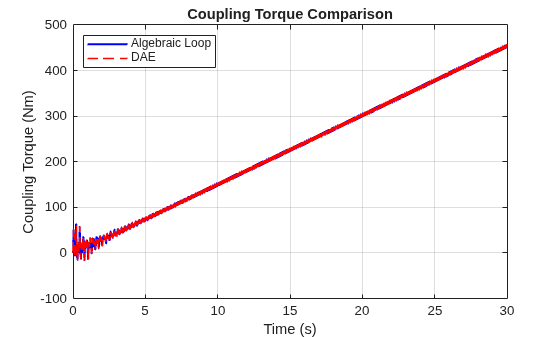
Solve Algebraic Loops as Differential-Algebraic Equations (DAEs)
Solve the algebraic loop in a practical drivetrain model as a differential-algebraic equation (DAE). The example compares the DAE approach to the algebraic loop solver and explains how to decide when to use each option.

